

Court Vision is a machine learning-powered mobile app that digests raw basketball footage
and outputs highlight clips of made baskets which you can share with groups of friends.
Court Vision

TEAM
1 Product Lead
4 Engineers
2 Designers
MY IMPACT
-
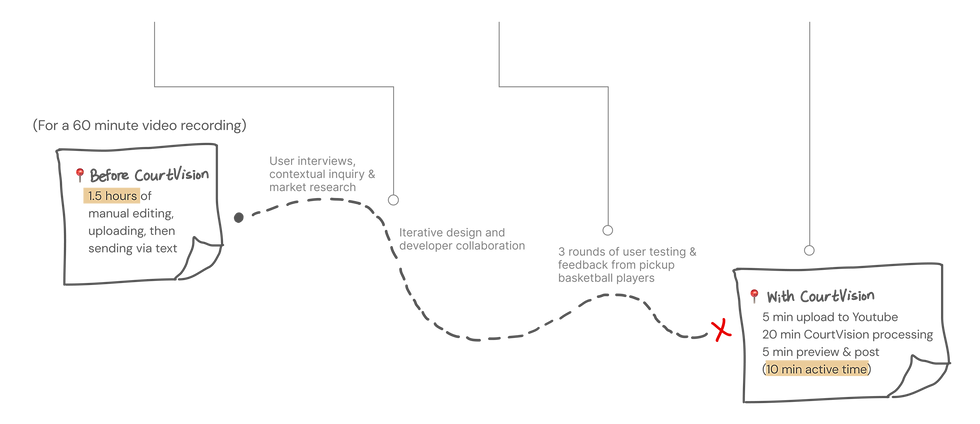
Core flow reduced highlight generation time 1.5 hr → 30 min (-66%)
-
Reduced clip selection flow abandonment rate 37% → 9% (-28%)
-
Reusable component adoption in design and development reduced design-eng handoff/mismatch sync time per cycle 120 → 45 min (-62%)
MY ROLE
User & Market Research
Design System
Wireframing & Prototyping
Product Strategy
Context
COURT VISION
I was engaged as a designer to bring the app from concept to MVP to beta. This app sought to give amateur pickup basketball players a way to easily create and share basketball memories using machine learning.
PROBLEMS
SOLUTION
❌ Manual clipping takes a lot of time and effort
❌ No central platform for viewing and sharing clips
❌ No sports video analysis solution for amateur players
✅ Drastically reduced time and effort spent on clipping highlights with the use of ML
✅ Provided central location for viewing and sharing highlight clips
✅ Strengthened friendships on and off court through clip sharing
UPLOAD & PROCESSING
Core Experiences


Facing time and resource limitations, the engineering team decided that throughout the app, updates would be triggered upon user interaction (tab switch or refresh) instead of pushed to the user automatically. Users may commonly expect push notifications, and I didn't want them to wait for an update and be frustrated when it doesn't come.
Thus, in keeping with the Visibility of System Status heuristic, I communicated through subheading text and toast message to let the user know what action they need to take to monitor the status of their upload. On screens with a background action, I was able to reduce misclicks by 15%.
In this flow, users upload their raw footage to be processed by the ML algorithm into highlight clips.
🟡 No push notifications
🟣 Why Youtube link
While we intend to support video hosting in the future, the current iteration requires videos to first be uploaded to Youtube.
However, this means that any video that the user finds can be clipped, and they aren't limited to videos they took themselves. It is a working solution that could complement the future capability of uploading from camera roll.
1. User starts by tapping the Upload button
2. User pastes in the Youtube link 🟣
3. Toast message notifies user that the clips are processing 🟡
4. Subheading text lets user know they need to refresh the page for progress updates 🟡
EDIT CLIPS & SHARE TO GROUP


To guide the user through this flow that involves many steps and decisions, I made sure that choices were reversible throughout and that there were clearly marked exit points. I also employed visual hierarchy and progressive disclosure to indicate the immediate next action for the user to progress in the flow. By reducing the cost of mistakes, I hoped to reduce friction and drop off for users. Over iterations, I raised 28% in task completion.
Oftentimes, different players show up on different days within the same pickup friend group. If the uploader couldn't recognize or remember the scorer of a specific shot, they can leave the field blank, and members of that group can tag the scorer post-upload.
🟢 Guiding users through a complex interaction
In this flow, the user reviews the clips generated by the ML algorithm, decides whether they want to keep them, has the option to tag the player or manipulate the length of the clip, and finally shares the clips to a group.
🔵 Assigning groups
🟠 What is Keep/Delete
The belief that sets our product apart is that sharing clips strengthens the community overall. This emphasis on the community aspect is reflected in the structural design of our app. Clips are meant to be shared with the people you played with. Therefore, the editing sequence begins with assigning the clip compilation to a desired group. (It is possible to create a group with just the user in it.)
Our ML algorithm does its best to return clips of made shots. Before sharing to a group, the user can preview the clips. In the event a false positive is included, or the user simply does not wish to keep a clip, they may choose to exclude it from the final compilation. (The decision is editable before posting.)
1. User starts by selecting a processed video
2. User then assigns the game to the group they will post to 🔵
3. User decides if they want to keep or delete the clip 🟠
4. Options to tag the scorer or manipulate clip length appear if user decides to keep the clip 🟢
5. User selects the scoring player 🟤
6. User taps to proceed to the next clip
7. User can change their mind about keeping/deleting by going to "Previous Clip" 🟢
8. Additional fields do not appear if user decides to delete the clip 🟢
9. User decides if they want to keep or delete the clip
10. When user has made a decision about all clips, they proceed to review the post
11. User sees a preview of the game that will be posted to the group
12. User is brought to the group page where they see their newly posted game
🟤 Tagging the scoring player
FILTER BY PLAYER
Working closely with the engineers throughout the entire process, I learned quickly that having a consistent design system with reusable components not only provided visual cohesion, it also enabled faster development.
Using modular components, I was able to deliver on concepts with a quick turnaround, and I also cut down time spent on handoff and mismatch syncs by 50%.
Prioritizing reusability and modularity


In this flow, the user can go into a group and see a specific group members' clips by tapping on their icon, then opening the clip player.
1. User taps on the group to see the games posted
2. User can tap on a user icon to see that member's clips
3. User taps to open the clip player
4. User navigates through clips using the buttons
Feel free to play around!

To recap
MISSIONS ACCOMPLISHED
✅ Tailored my solution to the unique needs of amateur pickup players
✅ Drastically reduced time spent on editing and compiling highlight clips
✅ Created a unified platform for sharing and viewing basketball clips
Future
FAST FOLLOWS
DISCOVERABILITY
ML IMPROVEMENTS
Building upon our intentionally minimal MVP, in the future we plan to support more basics:
-
Live search
-
Video hosting
-
Push-based architecture
As our user base grows, we will explore more ways for users and groups to connect:
-
Ability to see a group's videos without being a member
-
Ability to "follow" groups or players
Our engineers are developing our Re-ID algorithm, which attributes a player to a made basket. For our users, this means:
-
Ability to tag a player just by a picture, instead of watching the entire clip

